

Why I Dumped My USPS PO Box for a Virtual Mailbox with Anytime Mailbox
Unless you've had your head buried in the sand the last few months, you know the importance of having a plan B, C, and D. While I don't believe you can plan for every possible disaster, you can mitigate the stress by making decisions now that your future self will thank you for later. After removing some social media platforms, I decided to take a hard look at what was working and what was wasting time and money. I had to revise my tech stack and business operations to adapt to political and market changes. It started with replacing my USPS P.O. Box with an Anytime Mailbox (a virtual mailbox).

The USPS P.O. Box That Couldn't
When I first opened my USPS P.O. Box in 2016, I primarily used it for a now-defunct e-commerce travel clothing and accessories shop to avoid providing my physical address for email marketing. Unfortunately, that only worked for receiving and sending mail and packages, and I couldn't legally use it as a business mailing address. That meant that I was doxxing myself, and to this day, I continue to receive mail for that business at home.
It didn't stop there.
Right around the time of the 2020 lockdown, our post office lobby was vandalized twice. My mailbox was spared the first time, but they busted the lock beyond recognition the second time. I received a letter from the post office asking me to come pick up a new set of keys. There were several incidents afterward, and the post office reduced lobby hours from 9 pm to 6 pm and now closes on weekends. After that, I rarely checked the mailbox. It's probably been at least three months since I last checked the mail. It doesn't help that the lobby hours have changed, and getting to the box is somewhat of a pain in the ass.
Before You Commit to a Virtual Mailbox, Please Don't Make This Mistake
I didn't give the location much thought when renting a P.O. box. I figured I would be fine if I could get to it on the weekends. I also, for whatever reason, thought that the USPS one was better. I kept telling myself, “Please don't bother with the UPS Store, Postal Annex, or any other providers because it might be more of a hassle to set up and check mail.” I had no idea what the fuck I was talking about. Despite working from home for years, I also hadn't considered how often I traveled. I say this as I look at my unpacked suitcase and gear backpacks.
The idea of being married to one location makes me sick. Even writing that didn't make sense to me, considering I just told you how often I travel, and yet I had a piece of my life firmly planted in a physical mailbox. This is what autopilot looks like. I already have enough shit on my plate, and what I bought myself was a problem because I wasn't completely honest about my current business needs. I waited too long to explore other viable solutions because I didn't want to face reality. I tend to stick with things like software and systems until I no longer need them.
This time, I believe the hassle of setting up the initial P.O. box at the post office kept me from closing it, not to mention the hours I spent researching a better solution. However, it was time.
It took me less than one minute to close my P.O. box online. Two clicks and a disclaimer. Because I canceled my account before the fourth month, USPS refunded me 50% of the cost. I now have 10 days to pick up any remaining mail and hand over the keys.

I'll learn nothing from this. 🦄 💅🏼
The Missing Piece of My Virtual Office Setup and Maybe Yours, Too
For starters, I needed a replacement for my PO box ASAP. My renewal was set for July at $96 for 6 months (the initial cost was $82). I also needed a Bay Area address. Regardless of where I am in the world, the Bay Area is home. In a SHTF (shit hits the fan) situation, I need an address where I can continue doing business while traveling (including extended stays). I don't sell physical products, which gave me an advantage when looking for mailbox locations. I also needed a way to process mail and packages with minimal effort. Lastly, I needed a mailbox address to receive my bills and other business correspondence, without the hassle of the State of California vs. USPS P.O. Box situation.
I needed to do this quickly and online.
Given my current business needs and what I see ahead, a virtual mailbox would be sufficient. I have a separate phone number through GoDaddy Conversations (formerly GoDaddy SmartLine) and a fax number through Cocofax. Yes, a fax number.
It seems outdated in 202x, but I've said it before: people still fax. I'm looking at you, California Franchise Tax Board.

How I Chose My Anytime Mailbox Location
Besides being in the Bay Area proper, I needed to find a location I wouldn't mind going to if I needed to pick up mail. Of course, the point of getting the virtual mailbox was to avoid going to a physical location, but I still needed the option. I wanted to choose a tech hub city. My stomping grounds are the East Bay. For those unfamiliar with the San Francisco Bay Area, that's on the other side of the San Francisco Bay: Oakland, Alameda, etc. I noted where I am likely to go and which places I avoid. I'm rarely in San Jose, and have you seen the recent toll charges for crossing the bridge into San Francisco? oOF. While most locations closed at 6 p.m., safety was also a priority. How's the parking situation? Nobody wants to fight for a space in a Trader Joe's shopping center.
After narrowing it down to the three top-rated locations, I checked Yelp reviews and searched Google Maps Street View. Many virtual mailboxes in the US are located in a Postal Annex, a UPS Store, a FedEx Office, or a small mom-and-pop shop, usually in a shopping center. What are the other businesses around it? Does that even matter to you?
I believe I found it right smack in the middle of everywhere I want to be.

What To Expect When You're Setting Up Anytime Mailbox for the First Time
After you've chosen your virtual mailbox location and paid the location's deposit fee (mine was $9.99), you'll receive an email with instructions to complete USPS Form 1583. The form must be completed and notarized to verify your identity and authorize your chosen location to handle your mail and packages. This process helps safeguard your mail.
If you skip this step, your virtual mailbox will not be activated, and you will not receive mail at your chosen location.

You need to provide two identification forms: one must be a primary photo ID (e.g. Passport, School ID, Driver's License or State or Federal Issued ID Card etc.), and the other must confirm your current address (e.g. Current Lease/Mortgage or Insurance Policy, Vehicle Registration Card, Voter Card, Driver's License or State or Federal Issued ID card with your address on it).

These need to be two different ID forms. For example, you can't use your Driver's License twice.

I used my U.S. passport to verify my identity and my California Driver's License to verify my residence.
Online Notarization Process with Notarize by Proof
Anytime Mailbox has simplified the notarization process for USPS Form 1583 by providing online notary services. Just log in to your Anytime Mailbox account, follow the verification steps, and complete the notary process quickly and easily in just a few minutes!
Before starting the verification process, ensure you have a valid driver's license with the address listed on USPS Form 1583. It will be needed during the online notary process (Notarize by Proof).
Do this on a desktop/laptop. Use your phone for uploading and scanning the docs.
Thank me later.
Once logged in, you will be asked a few questions, making it feel like you're filling out a passport form. Please double-check everything before continuing. I didn't see a way to go back to correct the information. When you are done, the answers will auto-populate on the form. Before you finish the form, gather the documents you set aside: a primary photo ID and another to confirm your current address.
A pop-up will appear asking you to upload your documents. I suggest you have your mobile phone ready, as it's easier to scan your documents that way. Scan the QR code on the screen to begin. Follow the instructions. You must take two photos, front and back, for each identification form. After Proof has verified your documents, you can schedule an online notary appointment.
Check your camera and mic. Allow both to be used on the browser. You have to be on video. I know—my condolences. Choose the next available one and stay online. This will go by fast. Make sure your lighting is good, too.
My appointment was with a notary in Texas. The video call was recorded, and they verified that my information was accurate. One minute and done. That includes the part where I fussed with my mic because of the Logitech webcam settings. Remember what I said?
Look for the confirmation emails. I received one from Anytime Mailbox and one from Postal Annex.
Start Using Your Anytime Mailbox Virtual Mailbox
According to Anytime Mailbox, your application can take 2-3 business days to process. I received this information via email at 4:57 a.m., shortly after having the documents notarized, and my virtual mailbox was ready to use at 11:06 a.m. By lunch, I had updated my address everywhere and closed the P.O. box.
USPS Form 1583 is not the same as a USPS mail forwarding form.

It is not intended for mail forwarding, and the Commercial Mail Receiving Agency (CMRA) operator will not forward your mail. Instead, USPS Form 1583 authorizes the CMRA to receive mail on your behalf at the designated address.

If you wish to have USPS forward your mail, you will need to fill out a separate Change of Address form. You can download it through the Official USPS® Change of Address service.
Why I Chose Anytime Mailbox instead of iPostal1 or Other Virtual Mailbox Services
Countless YouTube videos and Reddit posts later, I kept running into the same complaints:
- Some locations were shady (e.g., fees started to increase), but this was the case across the board, so I don't hold it against the CMRAs.
- iPostal1 support sucks.
- The iPostal1 app is clunky.
- Traveling Mailbox doesn't have a pickup option.
- All other addresses are considered premium unless you use the Traveling Mailbox NC address.
- Traveling Mailbox is for US addresses only.
The bottom line is they all do the same thing, and you have to shop for one that fits your needs. Across the board, the consensus was that the location was more important than the virtual mailbox service provider. Many mailbox locations are available across all platforms. You'll start to see a pattern. Even though iPostal1 had the most available locations in California, I couldn't determine whether a mailbox location was suitable. Granted, I still had to do my due diligence and check reviews; adding that feature would have been nice.
This is my first time using a virtual mailbox and the Anytime Mailbox service, so I have nothing to compare it to other than a traditional USPS P.O. Box. I will update you as changes happen.
Anytime Mailbox First Impressions: Day One
I haven't received the email yet because, as of writing this post, the account is likely less than 24 hours old. Maybe I should send myself a letter or something to test it.
However, a few things have already irked me. The website needed a way to filter through locations by features and services. I should have been able to find mailbox locations that accept check deposits. I ended up with a location that doesn't. I will address that if it becomes an issue later.
The other filter that desperately needs more options is international forwarding. I can't check whether a location ships mail and packages internationally to all available destinations.
I did not have the option to click a button to upgrade or downgrade my plan. This may be more of how Commercial Mail Receiving Agency operators are set up. I don't know. It's not a deal-breaker, but it's not very pleasant. In that case, I'd need to start the process again to change mailbox locations.
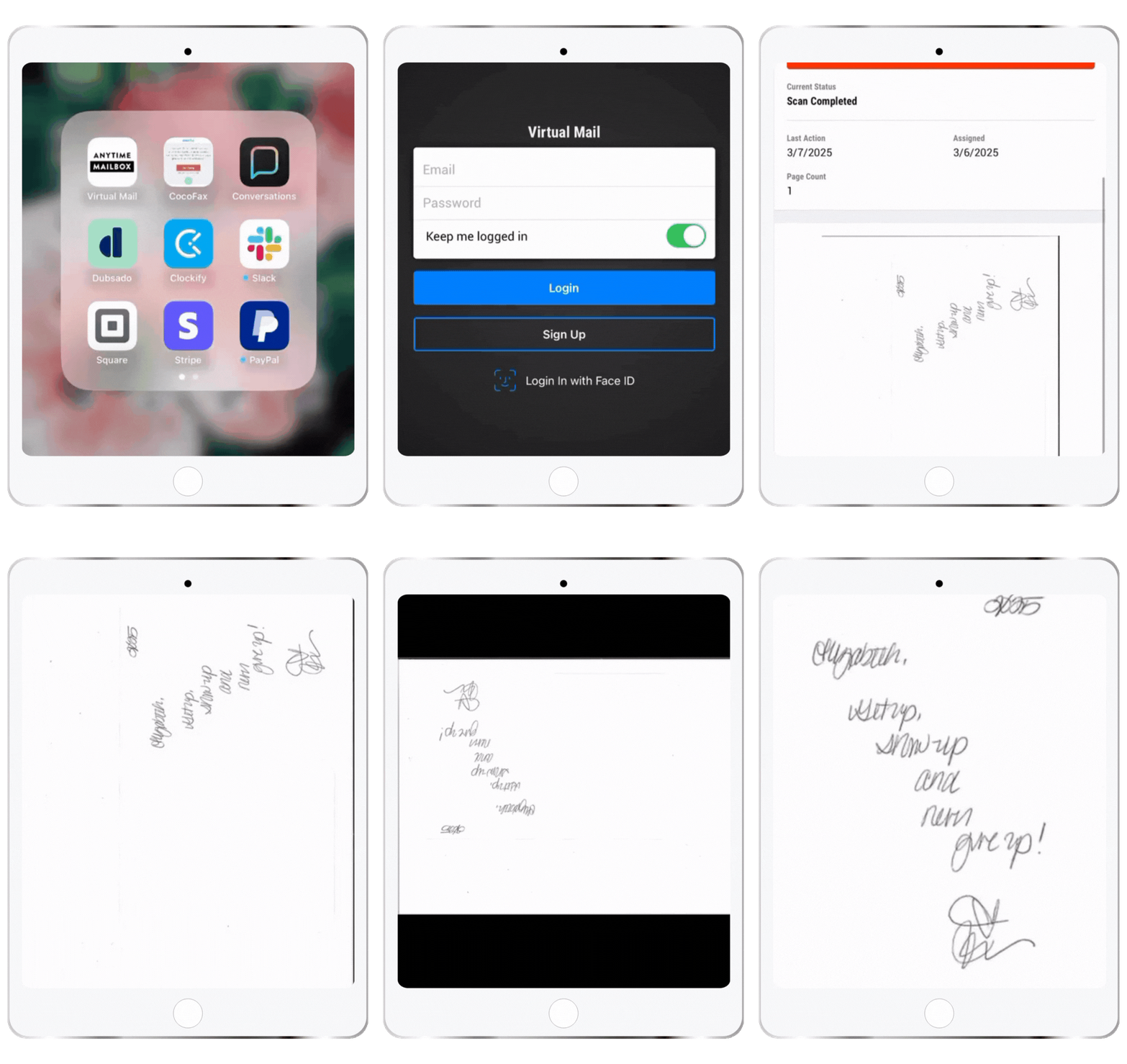
The app is barebones, but it works.

Under Settings, you can add more forwarding addresses. Yes, that means you'll need to prove residence there as well. Notifications are basic SMS. Type in your phone number, and you're good to go. The security settings are set to “Keep me logged in.” Use Face ID. *merp*
Help includes the virtual mailbox support contact information: an email address, a phone number, and a link to Anytime Mailbox's knowledge base.

Conclusion
Selecting the right virtual mailbox service can significantly improve your mail management, offering peace of mind, especially for online business owners. For individuals running an online business, a virtual mailbox keeps you organized and focused on your work without the disruption of physical mail. Additionally, you can travel freely while easily managing your email from anywhere.
To select a service that aligns with your specific needs, thoroughly evaluate your requirements. Start by researching the various options on the market, considering key factors such as security features, pricing structures (don't forget the overage fees if applicable), and the quality of customer support.
While making an informed decision is essential, it's equally important to avoid analysis paralysis. Sometimes, taking the leap and choosing a virtual mailbox provider to test out is the best approach. After all, you can't worry about whether it will work out until you receive your first piece of mail!
You can always try again.
Enjoy the convenience and security of efficient mail handling, freeing up time for more important elements of your life and business. With everything organized and accessible, you’ll experience a newfound sense of relief and satisfaction, confident that your mail is managed seamlessly at home or on the move.
Alright, it's time for me to pack!
So what does it look like to receive mail in the Anytime Mailbox app? Click here to find out.

THIS SITE USES AFFILIATE LINKS. THERE’S NO EXTRA COST TO YOU, BUT I RECEIVE A SMALL COMMISSION WHEN YOU USE THEM.
PIN ME!





💁🏻♀️ Community Guidelines
To ensure a positive and respectful environment for everyone, please take a moment to review our Community Guidelines. Following these guidelines helps us maintain a safe space for all.